

Gaming laptops are, all too often, an exercise in frustrating compromises. Do you want a thin and light model that sacrifices in power, or struggles with heat? Or do you want a thick beast of a laptop that can handle the latest titles for 30 minutes before the battery dies? Asus' ROG Flow X13 aims to give you both power and portability, without making huge sacrifices: you get a lightweight 2-in-1 touch screen laptop with midrange graphics for basic usage, and a compact external GPU for more top-tier gaming on-the-go. It's far from the first laptop we've seen that relies on an external box, but since Asus' XG Mobile eGPU uses the mobile version of Nvidia's RTX 3080, it's incredibly compact, meaning you can bring it with you when you want it – or leave it at home when you don't. I don't think it's a stretch to say that, despite its high price tag of $3,000, it's one of the most exciting gaming laptops I've seen in a while. [widget path="global/article/imagegallery" parameters="albumSlug=asus-rog-flow-x13-review&captions=true"] We're reviewing a model with the following specs:
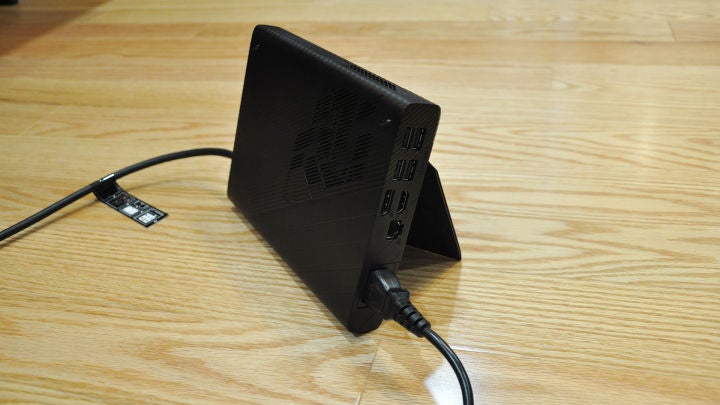 The docking station not only swaps your graphics for an RTX 3080 Mobile, but it also adds four more USB ports, HDMI and DisplayPort for an external monitor, and Ethernet for more stable online multiplayer (which is nice, because the port selection on the laptop itself is rather slim). In other words, you can bring your laptop home, dock it, and turn it into a compact gaming PC – or bring the XG Mobile with you, put the laptop in tent mode with its 360-degree hinge, and play with a gamepad. It's incredibly versatile, and you can really adapt it to whatever the situation calls for. Note, though, that the 1920x1200 display – while bright and colorful – is not G-Sync compatible, despite being labeled as "Adaptive Sync" on the product page (Asus tells me VRR would work with the integrated AMD graphics on the CPU, but who would want to use those?) Everything else on the laptop is incredibly well-made. The trackpad is smooth and accurate, and the keyboard has deeper travel than many modern thin-and-lights (it's no ThinkPad, but it's more than good enough for longer typing and gaming sessions.) The touch screen is handy, and while I don't consider the included stylus super necessary for a gaming laptop, it's a nice inclusion nonetheless. Oh, and the power button doubles as a fingerprint sensor for quick logins, which is a must-have on any modern machine. The webcam isn't compatible with face unlock, but hey – it has a webcam, which is more than I can say for some of Asus' other gaming laptops.
We haven't had a chance to test any other 3000-series laptops yet, but you can see how it performs against other more portable gaming laptops running 2000-series cards above. As you'd expect, standalone mode can't hold a candle to all-in-one gaming laptops, but once you connect the XG Mobile, it stomps anything from last generation in every benchmark. We'll see how it compares to other 3080-based laptops soon – these mobile chips can vary a lot from machine to machine – but it's clear this is a high-end gaming notebook. That performance translates well to actual games, too. Playing the Battlefield V campaign left me with no hiccups to speak of, easily hitting the high refresh rates needed to make use of the laptop's built-in display. Its response time isn't super fast, so you might see some ghosting in dark scenes, but it's nothing out of the ordinary for a laptop like this, and I hardly found it a burden. The keyboard was comfortable the whole way through, and the W key has a small bump on it so you can easily find your way back to WASD when gaming – one of those small touches I love to see.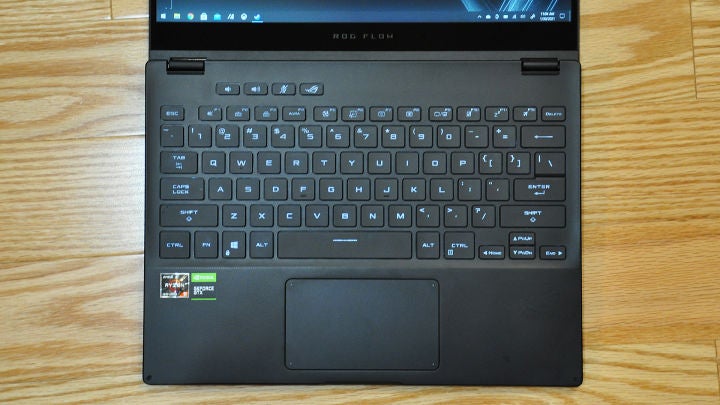 Of course, if you're doing serious gaming, you'll probably want an external gaming mouse of some sort, as trackpads – even trackpads as good as this one – don't give you the control you really need in a fast-twitch first-person shooter like this. If you do game with the trackpad, you'll need to set Windows' touchpad sensitivity to maximum to ensure the best tracking in-game. But seriously, get a small wireless mouse if you don't have one. For other games, like Rocket League, I liked to swivel the display into tent mode and use an Xbox controller. Asus says performance should be 5-10% better when using an external gaming monitor (due to more efficient usage of PCIe bandwidth) as well. I did find that I got a few more frames per second in some of our benchmarks when outputting exclusively to an external display, but your mileage may vary (depending on the game, the resolution, and the refresh rate). It's nothing to write home about, and anyone using an external monitor will do so because of the improved ergonomics and immersion anyway – not for a 5-10% performance boost. That said, while I expect most people would use this laptop for docked gaming, the built-in GTX 1650 makes for a decent on-the-go machine for casual sessions, too. I had to turn settings down in most titles to get decent framerates (Borderlands 3 on Very Low hovered around 60, for example), but it'll do the trick in a pinch.
 Ultimately, It's hard to compare the ROG Flow X13 directly to other gaming laptops, specifically because it's so unique and versatile. You pay for that versatility with a hefty price tag – the laptop isn't currently available separate from the XG Mobile bundle yet, so you currently have to buy the whole package for $3,000. Asus has said the laptop will be available standalone in the future, with a listing on their site for $1,499.99. The XG Mobile is the biggest selling point here, but frankly I like the laptop so much I could see owning one without the docking station too – it's just that good. I consider myself pretty picky when it comes to trackpads, keyboards, and displays, and using this laptop for everyday work was, frankly, a joy. Add on the external GPU, and you have exactly the kind of gaming laptop I've wished for all these years. It isn't 100% seamless, though. Every time you plug the laptop into the charger or XG Mobile, the screen will flash black for a second before bringing you back to what you were doing. And when you want to remove the docking station, you have to disconnect it from an icon in the system tray first – which takes about 20 seconds of waiting in front of a progress bar before you can pull the plug. I even had one or two situations where the dock jiggled out of place just enough to disconnect, necessitating a re-connection – despite the "lock" switch supposedly keeping it in place. (Though this was mostly due to me using the laptop in too cramped a space, and bending the cord too tightly.) These are small nuisances, but they're there.
 Of course, as with all high-powered laptops in a small chassis, the Flow X13 does get warm during those gaming sessions. In my 23° C office, the CPU got all the way up to 91° C during that Battlefield V game, and I clocked the external GPU at a maximum of 75° C. Neither thermal throttled, though, which has become all too common among thin and light laptops. That said, it's a bit of an unfair comparison given that the external GPU has its own enclosure and (rather loud) fan, so heat can be distributed across more surface area. Temperatures were similar when gaming on the internal GTX 1650. Opening up the laptop only requires the removal of 11 easily accessible screws from the bottom case. You can upgrade the NVMe storage if you need more space down the line, or replace the battery if it wears down and can't keep a charge – but the RAM is soldered on to the motherboard, so make sure you buy as much as you think you'll ever need for the life of the laptop. As for the XG Mobile, don't expect to be upgrading your graphics as the RTX 3080 ages either – its compact form factor is both boon and bane, since you can't swap in a new GPU like you can with larger Thunderbolt enclosures. But you may find that a worthy tradeoff, given its portable size.
Continue reading...
- Model: Asus ROG GV301QH-DS96
- Display: 13.4-inch IPS 120Hz at 1920x1200
- Processor: AMD Ryzen 9 5900HS (16M cache, up to 4.5GHz)
- Graphics: Nvidia GeForce 1650 4GB with Max-Q and ROG Boost (internal), and Nvidia RTX 3080 mobile (external)
- Memory: 16GB LPDDR4X
- OS: Windows 10 Home
- Storage: 1TB NVMe SSD
- Webcam: 720p
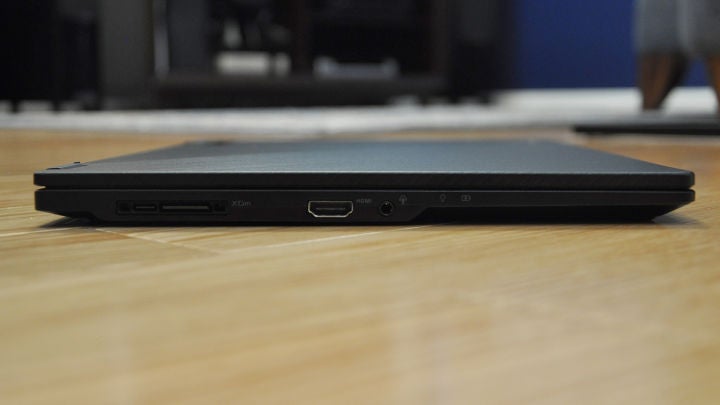
- Ports: 1x Docking Station port for XG Mobile, 1 x USB 3.2 Gen 2 Type-A, 1 x USB 3.2 Gen 2 Type-C with Power Delivery and DisplayPort, 1 x HDMI 2.0b, 1 x 3.5mm Combo Audio Jack. XG Mobile docking station adds 4 x USB Type-A, 1 x HDMI, 1 x DisplayPort, 1 x Ethernet, and 1 x A/C power
- Connectivity: Wi-Fi 6 (802.11ax), Bluetooth 5.1
- Battery: 62Wh
- Dimensions: 11.8" x 8.7" x 0.6"
- Weight: 2.9 lbs
- Price (as tested): $2,999.99
Design and Features
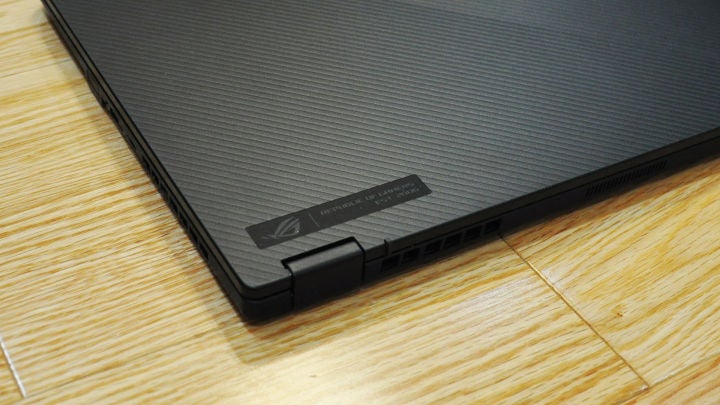
On its own, it might be easy to mistake the Flow X13 for your typical thin and light laptop. It's clean design belies the gaming prowess it's capable of, with a typical black square shape sporting a few small "gaming" flourishes, like the texture on the lid and the font on the backlit keyboard. There's no RGB, no extended "forehead" like you see on some Max-Q laptops – just a really well-built Ultrabook-sized notebook you can toss in your bag without a second thought. [poilib element="poll" parameters="id=fe8f0c88-ec42-4676-aca5-993e1ac9c278"] Granted, that's because out of the box, this laptop isn't going to blow away any gaming benchmarks. The GTX 1650 inside is no slouch – it'll play casual or lower-fidelity games without skipping a beat – but if you want to do some more serious gaming, you'll need to plug in the ROG XG Mobile docking station, which connects with a proprietary PCIe/USB-C combo connector. (Right now, the XG Mobile is only listed as compatible with the Flow X13 – but it's possible that Asus could release other compatible laptops in the future.) When you hook it up, you'll get a popup on the laptop asking whether you want to enable the higher-end graphics, and after clicking OK, you'll wait a few seconds while it switches over. Your user needs to be an administrator for it to work, but that shouldn't be a hurdle for most people.
The docking station not only swaps your graphics for an RTX 3080 Mobile, but it also adds four more USB ports, HDMI and DisplayPort for an external monitor, and Ethernet for more stable online multiplayer (which is nice, because the port selection on the laptop itself is rather slim). In other words, you can bring your laptop home, dock it, and turn it into a compact gaming PC – or bring the XG Mobile with you, put the laptop in tent mode with its 360-degree hinge, and play with a gamepad. It's incredibly versatile, and you can really adapt it to whatever the situation calls for. Note, though, that the 1920x1200 display – while bright and colorful – is not G-Sync compatible, despite being labeled as "Adaptive Sync" on the product page (Asus tells me VRR would work with the integrated AMD graphics on the CPU, but who would want to use those?) Everything else on the laptop is incredibly well-made. The trackpad is smooth and accurate, and the keyboard has deeper travel than many modern thin-and-lights (it's no ThinkPad, but it's more than good enough for longer typing and gaming sessions.) The touch screen is handy, and while I don't consider the included stylus super necessary for a gaming laptop, it's a nice inclusion nonetheless. Oh, and the power button doubles as a fingerprint sensor for quick logins, which is a must-have on any modern machine. The webcam isn't compatible with face unlock, but hey – it has a webcam, which is more than I can say for some of Asus' other gaming laptops.
Software
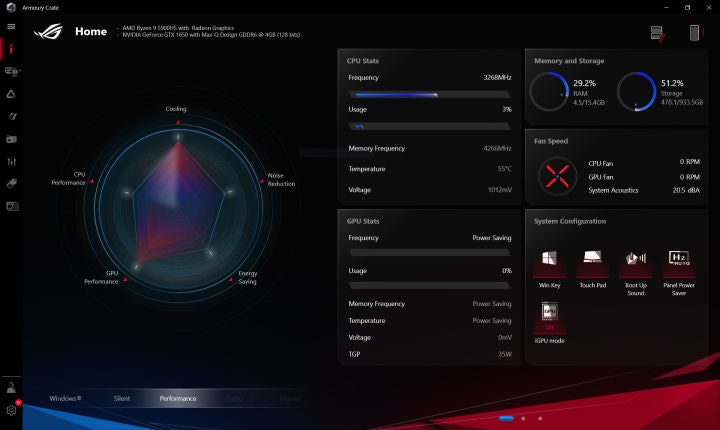
Asus' Armory Crate software is necessary for the eGPU to do its job, but for the most part, you rarely have to interact with it if you don't want to. It allows you to switch between different power profiles, see statistics like CPU usage and temperature, and sync lighting with other Asus Aura products. It's a bit feature-bloated, to be honest, and the power profiles cause more confusion than they solve. But its background services don't take up much in terms of resources, so you can feel free to leave it closed and forget about it. Also annoyingly, the external GPU's blinding red light doesn't sync with AURA, so there doesn't seem to be a way to dim or turn it off. The MyAsus app is strangely similar, though clearly built with Asus' wider laptop selection in mind, not just the gaming models. It provides some diagnosis tools if you encounter problems, a driver updater, and power management tools – I'm not sure why both of these tools are necessary, but they're there if you want them. I don't consider them a huge pro or con, and most users probably won't need to mess with them much. The McAfee trial, on the other hand, I'd uninstall as soon as you get the laptop. It absolutely doesn't belong on a $3,000 machine, and shame on Asus for including garbage like this on such a premium device.Performance and Gaming
Since the ROG Flow X13 is kind of like two machines in one, I ran each of our PC and gaming benchmarks twice: once with the laptop operating standalone using the GTX 1650, and another plugged into the included XG Mobile external GPU.| Acer Predator Triton 500 | Asus ROG Flow X13 | Asus ROG Flow X13 (with XG Mobile) | Razer Blade 15 Advanced | |
| Price as tested | $2,499 | $1,499.99 | $2,999.99 | $2,799 |
| CPU | Intel Core i7-10750H | AMD Ryzen 9 5900HS | AMD Ryzen 9 5900HS | Intel Core i7-10875H |
| GPU | Nvidia RTX 2080 Super | NVIDIA GTX 1650 | NVIDIA RTX 3080 | Nvidia RTX 2080 Super |
| 3DMark Time Spy | 7874 | 3223 | 10146 | 7680 |
| 3DMark Fire Strike | 17857 | 7563 | 23079 | 16593 |
| 3DMark Night Raid | 38254 | 26721 | 44307 | 35805 |
| Total War: Three Kingdoms | 65.93 | 31.6 | 80.0 | 64 |
| Borderlands 3 | 66.61 | 24.18 | 87.56 | 65 |
| Metro Exodus | 51.15 | 22.67 | 64.86 | 48.98 |
| Unigine Heaven 4.0 | 107.1 | 37.8 | 135.7 | 103 |
| PCMark 10 | 6369 | 5493 | 6823 | 5467 |
| PCMark 10 Battery Test | 3:58 | 9:05 | N/A | 6:14 |
Gaming tests run at 1920 x 1080 with Ultra settings, best scores bolded.
We haven't had a chance to test any other 3000-series laptops yet, but you can see how it performs against other more portable gaming laptops running 2000-series cards above. As you'd expect, standalone mode can't hold a candle to all-in-one gaming laptops, but once you connect the XG Mobile, it stomps anything from last generation in every benchmark. We'll see how it compares to other 3080-based laptops soon – these mobile chips can vary a lot from machine to machine – but it's clear this is a high-end gaming notebook. That performance translates well to actual games, too. Playing the Battlefield V campaign left me with no hiccups to speak of, easily hitting the high refresh rates needed to make use of the laptop's built-in display. Its response time isn't super fast, so you might see some ghosting in dark scenes, but it's nothing out of the ordinary for a laptop like this, and I hardly found it a burden. The keyboard was comfortable the whole way through, and the W key has a small bump on it so you can easily find your way back to WASD when gaming – one of those small touches I love to see.
Of course, if you're doing serious gaming, you'll probably want an external gaming mouse of some sort, as trackpads – even trackpads as good as this one – don't give you the control you really need in a fast-twitch first-person shooter like this. If you do game with the trackpad, you'll need to set Windows' touchpad sensitivity to maximum to ensure the best tracking in-game. But seriously, get a small wireless mouse if you don't have one. For other games, like Rocket League, I liked to swivel the display into tent mode and use an Xbox controller. Asus says performance should be 5-10% better when using an external gaming monitor (due to more efficient usage of PCIe bandwidth) as well. I did find that I got a few more frames per second in some of our benchmarks when outputting exclusively to an external display, but your mileage may vary (depending on the game, the resolution, and the refresh rate). It's nothing to write home about, and anyone using an external monitor will do so because of the improved ergonomics and immersion anyway – not for a 5-10% performance boost. That said, while I expect most people would use this laptop for docked gaming, the built-in GTX 1650 makes for a decent on-the-go machine for casual sessions, too. I had to turn settings down in most titles to get decent framerates (Borderlands 3 on Very Low hovered around 60, for example), but it'll do the trick in a pinch.
Ultimately, It's hard to compare the ROG Flow X13 directly to other gaming laptops, specifically because it's so unique and versatile. You pay for that versatility with a hefty price tag – the laptop isn't currently available separate from the XG Mobile bundle yet, so you currently have to buy the whole package for $3,000. Asus has said the laptop will be available standalone in the future, with a listing on their site for $1,499.99. The XG Mobile is the biggest selling point here, but frankly I like the laptop so much I could see owning one without the docking station too – it's just that good. I consider myself pretty picky when it comes to trackpads, keyboards, and displays, and using this laptop for everyday work was, frankly, a joy. Add on the external GPU, and you have exactly the kind of gaming laptop I've wished for all these years. It isn't 100% seamless, though. Every time you plug the laptop into the charger or XG Mobile, the screen will flash black for a second before bringing you back to what you were doing. And when you want to remove the docking station, you have to disconnect it from an icon in the system tray first – which takes about 20 seconds of waiting in front of a progress bar before you can pull the plug. I even had one or two situations where the dock jiggled out of place just enough to disconnect, necessitating a re-connection – despite the "lock" switch supposedly keeping it in place. (Though this was mostly due to me using the laptop in too cramped a space, and bending the cord too tightly.) These are small nuisances, but they're there.
Of course, as with all high-powered laptops in a small chassis, the Flow X13 does get warm during those gaming sessions. In my 23° C office, the CPU got all the way up to 91° C during that Battlefield V game, and I clocked the external GPU at a maximum of 75° C. Neither thermal throttled, though, which has become all too common among thin and light laptops. That said, it's a bit of an unfair comparison given that the external GPU has its own enclosure and (rather loud) fan, so heat can be distributed across more surface area. Temperatures were similar when gaming on the internal GTX 1650. Opening up the laptop only requires the removal of 11 easily accessible screws from the bottom case. You can upgrade the NVMe storage if you need more space down the line, or replace the battery if it wears down and can't keep a charge – but the RAM is soldered on to the motherboard, so make sure you buy as much as you think you'll ever need for the life of the laptop. As for the XG Mobile, don't expect to be upgrading your graphics as the RTX 3080 ages either – its compact form factor is both boon and bane, since you can't swap in a new GPU like you can with larger Thunderbolt enclosures. But you may find that a worthy tradeoff, given its portable size.
Battery Life
Gaming laptops aren't generally known for incredible battery life, but the ROG Flow X13 holds its own well thanks to the lower-powered GTX 1650. In PCMark's battery life test, the Flow stayed alive for just above 9 hours, which is fantastic if you're looking to get through a workday without an outlet. Switching to the integrated AMD graphics didn't make an appreciable difference, unfortunately – so there's rarely a reason to change this setting. You won't be able to game with the RTX 3080 unless the docking station is plugged in to the wall, but the GTX 1650 is up to some tasks on its own, so if you plan on gaming with it on-the-go, be prepared for battery life to shrink a bit. I found the Flow could handle a little under two hours of gaming disconnected from power, which again, isn't bad. And I love that it comes with two chargers: one built in to the docking station, and a smaller USB-C charger when you don't want to bring the dock with you. If you have a battery pack capable of USB Power Delivery, that'll work too. [widget path="global/article/imagegallery" parameters="albumSlug=best-gaming-laptops&captions=true"]Purchasing Guide
The Asus ROG Flow X13 with a Nvidia RTX 3080 eqipped ROG XG Mobile is available for $2,999 directly from Asus.Continue reading...