
hello, im having trouble with upgrading my mini to the newest update but cant. whenever i try downloading the 1.059 update it directs me to a page full of random coding. i was able to download the actual tool, but whenever i click on check for update it says update check fail. has anyone come across this problem at all? its pretty annoying since i did contact smok, but i cant seem to get through with them on whats going on.

Become a Patron!
You are using an out of date browser. It may not display this or other websites correctly.
You should upgrade or use an alternative browser.
You should upgrade or use an alternative browser.
upgrading the smok xcube mini 2
- Thread starter dcharb03
- Start date

bump
OK, I don't have this mod, wanted to say that and I'm curious, LOL ... but, I've gone to their site, installed the update tool, double clicked on this:

and then it gives me this:
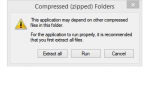
Is this what you see, too?
and then it gives me this:
Is this what you see, too?

I can notif Admin that one needs to be removed. Which one you wanna keep?well i guess i have two accounts from different computers. totally forgot about this one, but yeah i am dcharb
Oh hey... did you "extract all files" ??yeah, i got that. i click on run and it opens the actual tool. but whenever i select the mini on the menu and click check for update it says that it fails. thanks for helping too, i just got this mod; i do like it, but the whole second delay is pretty annoying.

hello, im having trouble with upgrading my mini to the newest update but cant. whenever i try downloading the 1.059 update it directs me to a page full of random coding. i was able to download the actual tool, but whenever i click on check for update it says update check fail. has anyone come across this problem at all? its pretty annoying since i did contact smok, but i cant seem to get through with them on whats going on.
Just right click on the hyperlink and pick "Save link as..."


1. Extract all files before running the updater
2. Take out battery before plugging mod into PC (using data cable, and holding the fire bar the entire time, even before plugging it in)
3. Let PC find drivers before opening the Updater
4. Run Updater once drivers installed, click check update, and proceed with update
Side note: If you haven't unlocked all TC modes yet (they are now free), just connect to phone app via Bluetooth, go to settings, and click both update icons in the settings, voila!
2. Take out battery before plugging mod into PC (using data cable, and holding the fire bar the entire time, even before plugging it in)
3. Let PC find drivers before opening the Updater
4. Run Updater once drivers installed, click check update, and proceed with update
Side note: If you haven't unlocked all TC modes yet (they are now free), just connect to phone app via Bluetooth, go to settings, and click both update icons in the settings, voila!