Become a Patron!

Alternate Universe

Midniteoyl

Gold Contributor
Member For 4 Years
Member For 3 Years
Member For 2 Years
Member For 1 Year
Member For 5 Years

Pre-dinner munchie:D

IMG_20150201_172728623_zpsb933c7a7.jpg
Dont have a pic, but we had fried chicken, fried cheese, and stuffed jalapeno poppers..
 

muth

Gold Contributor
Member For 5 Years
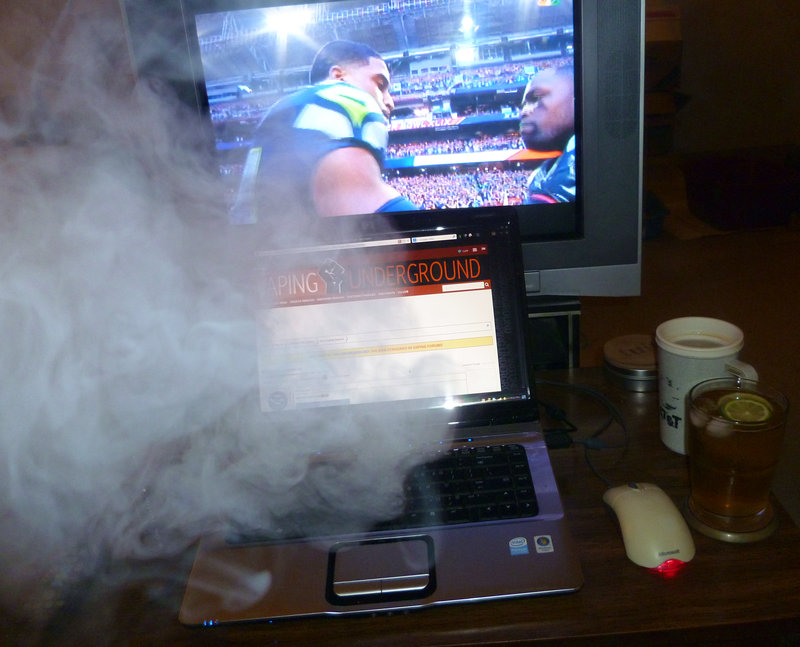
CEAB6h2.jpg


Seahawks won the toss...woop! :D

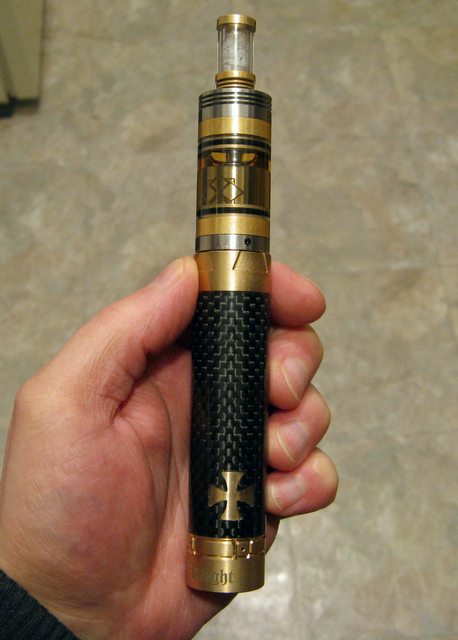
Vaping this, but swapped out the Quartz tank for a the 3-section Foggy tank for more capacity.
Rocking 0.8 ohms and it is wicking like a Boss. :D

au9xefzl.jpg
Who does your nails?
 
D

Donald Bickers

Guest
I wanted Seattle to win ,,,,,they were pretty unsportsmanlike in the end though,,,,,sorta understandable
 

glassgrl

Gold Contributor
Member For 4 Years
Member For 3 Years
Member For 2 Years
Member For 1 Year
Member For 5 Years
Somewhere there is a tabby named Tiki.....consoling a very shell shocked adult male.
I bet @CaFF is very disappointed but that really was a VERY good game. Except for the end part. I have some friends in the PacWest that have stood by the Seahawks when it looked like they'd never make it back. 2 back-to-back SBs is freaking awesome for them.
 

vaperature

Gold Contributor
Member For 4 Years
Member For 3 Years
Member For 2 Years
Member For 1 Year
Member For 5 Years
That's what they get for giving us GRUNGE
 

Midniteoyl

Gold Contributor
Member For 4 Years
Member For 3 Years
Member For 2 Years
Member For 1 Year
Member For 5 Years
I tuned in briefly but could not understand why so many fat guys were running about on the green....and where is the flag? Och, NBA Football is so odd.
And you call yourself an American... :oops:
 

MKPM

AMG
Diamond Contributor
Member For 4 Years
Member For 3 Years
Member For 2 Years
ECF Refugee
It was a very good, except for the end part - Packers fans
 

Midniteoyl

Gold Contributor
Member For 4 Years
Member For 3 Years
Member For 2 Years
Member For 1 Year
Member For 5 Years
ok,for all you computer guys out there,,,,,,my computer OS is windows seven,im using the virus software that came installed on it,it keeps installing "Search Protect"and "Dolphin Deals"all by itself,and that changes my search provider to Search Protect
how do I go about stopping this from happening?
Malwarebytes, AdAware, Spybot, .. If those dont fix it:

Before you proceed with the uninstallation, make sure you are logged in as a system administrator. Also, please save a copy of your important documents/files on an external hard drive. Be careful during the uninstallation process, as Conduit will attempt to keep as much its components as it can to continue slowing down your PC.
1. From your desktop, click on Windows Start button and choose Control Panel option (Windows 8 users: right-click on Windows Start icon (by default, it is located in the left bottom corner of your screen), and choose Control Panel from the context menu):

• Double-click Programs and Features (Windows Vista, 7 and 8), or Add or Remove Programs (Windows XP).

• Find ‘Search Protect’ by Conduit in the list, right-click on it and choose Uninstall.

• When a window below opens, you have to manually choose new desired Home page, as well as to check bottom box ‘Go back to my original home page and default search settings):

4_17.png
• Click on ‘Uninstall’ button and follow the removal steps. Once done, reboot your PC.

2. Now please make sure that you don’t have a ‘Background Container’ task on your PC:

• Press Windows+R keys on your keyboard. In the opened window type msconfig and press Enter.

• In the System Configuration window, open ‘Startup’ tab and search for an item called ‘Background Container’. If you don’t have one in the list, jump to the step 3. If you do, finish the below instructions first.

• Uncheck the ‘Background Container’ task, then click ‘Apply’ and ‘OK’:

5_11.png


• Reboot PC again.

• Right click on ‘My Computer’ on your desktop -> choose ‘Manage’ from the context menu -> expand ‘System Tools’ and ‘Task Scheduler’ menus-> click on ‘Task Scheduler Library’ -> once a list of tasks appears in the right part of the window, find ‘BackgroundContainer Startup Task’ and double-click on it:

6_8.png


• In a new opened window, click on the ‘Actions’ tab and double-click the action in question.

• In the next window, find ‘Add arguments (optional):’ section -> highlight ALL the path in the field box of this section -> press ‘Delete’ button on your keyboard -> click ‘OK’:

7_3.png


3. Now please make sure that hidden files in your Windows Explorer are open: Start –> Control Panel (Appearance and Personalization) –> Folder Options –> ‘View’ tab –> find ‘Hidden files and folders’ setting, and choose an option ‘Show hidden files, folders, and drives’.

4. Open every path below and make sure there are no Conduit related folders/files on your disc C: (if you find some of them, delete these manually by highlighing a folder/file in question, and pressing Shift+Del keys on your keyboard):

C:\Windows\SysWOW64\SearchProtect (XP users and users with 32bit OS don’t have this folder)
C:\Program Files\SearchProtect
C:\Program Files\Conduit
C:\ProgramData\Conduit
C:\Users\YOUR_USER_NAME\AppData\Local\Conduit
C:\Users\YOUR_USER_NAME\AppData\LocalLow\Conduit
C:\Users\YOUR_USER_NAME\AppData\Roaming\SearchProtect
C:\Users\adm\AppData\Roaming\Mozilla\Firefox\Profiles\gqehixkj.default\searchplugins\conduit-search (.xml file)
C:\Users\YOUR_USER_NAME\AppData\Local\Temp – delete 2 folders called ‘ct1066435’ and ‘CT3281067’. Also, please remove here all the files with SearchProtect logo:

8_3.png
 

Midniteoyl

Gold Contributor
Member For 4 Years
Member For 3 Years
Member For 2 Years
Member For 1 Year
Member For 5 Years
Part 2...


XP

C:\program files\Conduit
C:\program files\SearchProtect
C:\Documents and Settings\YOUR_USER_NAME\Local Settings\Temp\Conduit
C:\Documents and Settings\YOUR_USER_NAME\ApplicationData\Mozilla\Firefox\Profiles\XXXX.default\searchplugins – and delete a file called ‘conduit-search’
C:\Documents and Settings\YOUR_USER_NAME\Local Settings\Temporary Internet Files\SPSetup

5. Now please make sure that you don’t have any traces of Conduit Search Protect in your browsers:

Mozilla

• Click on the Menu button in the right part of Firefox window (older versions of browser: click on the orange upper left ‘Firefox’ logo) -> find Add-ons section -> Check ‘Extensions’ and ‘Plugins’ tabs, and disable/remove any add-on that contains words ‘conduit’ or ‘search protect’.

• Again click on the Menu button -> Options :

• In the General tab ‘Home Page’ field, make sure there is no http://search.conduit.com link. In you have one, either highlight and delete it, or use the ‘Restore to Default’ button (to return to your previous Home page);

• In the Security tab make sure that all the 3 options: Warn me when sites try to install add-ons, Block reported attack sites and Block reported web forgeries are checked;

• In the main Firefox window, click ‘Search Engines’ field (right upper corner), and open ‘Manage Search Engines…’ option. Highlight all the unwanted search engines and click on ‘Remove’ button;

• Type about:config in the address bar of Firefox -> click on the ‘I’ll be careful, I promise!’ button - > in a new window search field, please type conduit and press ‘Enter’ -> right click on every result it finds, and choose ‘Reset’ from the context menu.

Google Chrome

• Type chrome://settings in the Chrome address bar and press ‘Enter’ to open Chrome Settings menu -> in the ‘On Startup’ section -> ‘Open a specific page or set of pages.’ option, click on the ‘Set pages’ link -> if you find ‘search.conduit.com’ here, hover your mouse to this line for a ‘Delete’ option to appear, and click ‘x’ to remove this page from startup;

• In the ‘Appearance’ section, when the ‘Show Home button’ is checked and you see ‘search.conduit.com…’ link, please click on ‘Change’ and remove this link from your browser;

• In the ‘Search’ section, click on ‘Manage search engines…’ -> hover your mouse cursor to any search engine for the ‘Make default’ and ‘Delete’ menu to appear. You can delete all the unnecessary search engines, and make default the desired one:

9_3.png


Internet Explorer

• When IE window is opened, press Alt+x keys on your keyboard to open a Tools menu -> Internet Options -> General Tab: highlight and delete everything in the Home page field box -> click on ‘Use new tab’ button, type a web address of search engine you want to set up as your home page, and click ‘Apply’. You can also set other custom settings of your startup page display in the ‘Startup’ section (to start with your last session, for example):

10_1.png


• Tools menu -> click on the ‘Manage add-ons’ option -> check whether there are no Conduit Ltd Toolbars and Extensions or Search Engines here; if you find ones, either disable or remove these.

6. Before you start working with the Registry, please make sure that you understand how important this part of your PC is. You cannot revert data from here if you delete anything (Ctrl+Z never works here), and if you delete an incorrect component, it may damage your OS and make it unusable.

You should also know the difference between Keys, Values and Values’ Data:

KEY: you can delete a key in this part of registry if its name exactly matches a program you don’t need anymore.
VALUE: you can delete all the value if its name exactly matches a program you don’t need anymore.
VALUE DATA: you can modify/delete value data by double-clicking on the Value in question.

*Note. Be attentive while working with the Value data. Some harmful programs may inject their code to the system processes. In such case, you should remove a string of the harmful program only, and always leave the initial system path.

11.png


• To open the Registry, press ‘Win+R’ keys on your keyboard -> in the opened command prompt window type regedit and press ‘Enter’.

• Highlight 1st section called ‘Computer’ -> press Ctrl+F keys on your keyboard -> make sure Keys, Values, Data boxes in the ‘Find’ window are checked -> type Conduit in the search field and click OK. The search result will highlight a key/value/data that contains Search Protect components. If you find the exact key name of the program you want to remove, right click on the element in question and choose ‘Delete’. If it’s a value/data, right click on the value and choose ‘Modify’, then remove harmful data (see notes how to edit separate elements below*). Use F3 key on your keyboard to find all the search results.

• Repeat the above instructions with the words SearchProtect and BackgroundContainer.

Exit the registry editor and reboot your PC.

• *Here are the values/keys/data (in bold) that may stay in your registry, and it’s better to delete these. Note. It’s normal if you don’t find some of the components in your registry – it means they were already deleted. Pay attention to the comments next to some of the paths:
o HKEY_CURRENT_USER\Software\Conduit
o HKEY_CURRENT_USER\Software\AppDataLow\Software\Conduit
o HKEY_CURRENT_USER\Software\AppDataLow\Software\BackgroundContainer
o HKEY_CURRENT_USER\Software\Microsoft\Internet Explorer\SearchScopes\{18678918-2C78-4EF5-A755-CAB3CC54F45F} or {A30F335A-1BD5-4B44-82E1-76F72E1C4597}
o HKEY_LOCAL_MACHINE\SOFTWARE\Classes\Wow6432Node\CLSID\{3c471948-f874-49f5-b338-4f214a2ee0b1} – delete the value data of Conduit Community Alerts
o HKEY_CLASSES_ROOT\Wow6432Node\CLSID\{3c471948-f874-49f5-b338-4f214a2ee0b1}\InprocServer32 – delete data in the value called ‘Default’ (C:\Program Files (x86)\Conduit\Community Alerts\Alert.dll)
o HKEY_LOCAL_MACHINE\SOFTWARE\Microsoft\Shared Tools\MSConfig\startupreg\BackgroundContainer – value is called ‘command’ -> right click on it and choose ‘Modify’ -> in the Value data leave the following string only: "C:\Windows\SysWOW64\Rundll32.exe", and delete everything after (i.e., "C:\Users\adm\AppData\Local\Conduit\BackgroundContainer\BackgroundContainer.dll",DllRun)
o HKEY_LOCAL_MACHINE\SOFTWARE\Wow6432Node\Conduit
o HKEY_LOCAL_MACHINE\SOFTWARE\Wow6432Node\Microsoft\Internet Explorer\Low Rights\ElevationPolicy\{D3A0F898-A6DF-468C-94BB-51C2DD24F676} or {40FA19B4-9006-41DA-BB11-F936BE177162} – delete the application path - C:\Users\user\AppData\Local\Conduit\CT3289075
o HKEY_USERS\S-1-5-21-2858020935-2156992550-3658131804-1003\Software\Microsoft\Internet Explorer\SearchScopes – delete data in 3 values called:

- DisplayName (data: ‘Conduit Search’)
- SuggestionsURL_JSON (data: http://suggest.search.conduit.com/CSuggestJson.ashx?prefix={searchTerms})
- URL: (data: http://search.conduit.com/Results.a...-4F0A-845E-D5A7D3A0BF22&q={searchTerms}&SSPV= )

o HKEY_USERS\S-1-5-21-2858020935-2156992550-3658131804-1003\Software\AppDataLow\Software\BackgroundContainer
o HKEY_USERS\S-1-5-21-2858020935-2156992550-3658131804-1003\Software\AppDataLow\Software\Conduit
o HKEY_USERS\S-1-5-21-2858020935-2156992550-3658131804-1003\Software\AppDataLow\Software\BackgroundContainer
o HKEY_USERS\S-1-5-21-2858020935-2156992550-3658131804-1003\Software\AppDataLow\Software\ConduitSearchScopes
o HKEY_USERS\S-1-5-21-2858020935-2156992550-3658131804-1003\Software\Conduit

7.
It is recommended to always keep your antivirus up-to-date and perform weekly full scans. Also, we advise you to do a custom AV scan of any application downloaded from the internet before you proceed with its installation.

• If you do not have an antivirus, click here to download Ad-Aware Free Antivirus+ and follow the installation instructions from Ad-Aware User Guide (‘Installation and Uninstallation’ -> ‘Ad-Aware Install’ section).

• Perform a full scan of your PC with Ad-Aware (following Ad-Aware User guide: ‘Scanning System’ -> ‘Running a scan’ section).

http://lavasoft.com/mylavasoft/company/blog/how-to-remove-search-protect-by-conduit-ltd
 

vaperature

Gold Contributor
Member For 4 Years
Member For 3 Years
Member For 2 Years
Member For 1 Year
Member For 5 Years
Just run combofix but if it fries your computer don't blame me.
 

Cruel-Phate

Just Thomas
VU Donator
Gold Contributor
Member For 4 Years
I bet @CaFF is very disappointed but that really was a VERY good game. Except for the end part. I have some friends in the PacWest that have stood by the Seahawks when it looked like they'd never make it back. 2 back-to-back SBs is freaking awesome for them.

At least CaFF had awesome nachos....I myself was hoping for a meteor to hit the stadium last night so that nobody could win :) I knew my odds were slim to none, oh well :(
 

glassgrl

Gold Contributor
Member For 4 Years
Member For 3 Years
Member For 2 Years
Member For 1 Year
Member For 5 Years
And on an unrelated-but-not-really-SB note, I was surprised how early it got dark in AZ with out daylight savings. Only around 6:30ish there and dark enough for fireworks. And Missy looked damn good. OK, that is all. :)
 

muth

Gold Contributor
Member For 5 Years
I've seen several people make comments about the size of pics, but my browsers (Chrome, FF and Safari) always just show them in-line and in full view in the message box.

Wonder what's different for some of you?
I'm using chrome and when I upload a pic from my files it always gives me a choice of thumbnail or full size. Are you uploading from a different location? Just a guess, I'm not savvy on such matters.
 

vaperature

Gold Contributor
Member For 4 Years
Member For 3 Years
Member For 2 Years
Member For 1 Year
Member For 5 Years
Guess what, I'm soon going out for round four of snow shoveling. Can't leave this place like this for the tenants to slop through in the morning. It's like a video game and I've come to the great boss battle, can't give up now.
 

Midniteoyl

Gold Contributor
Member For 4 Years
Member For 3 Years
Member For 2 Years
Member For 1 Year
Member For 5 Years
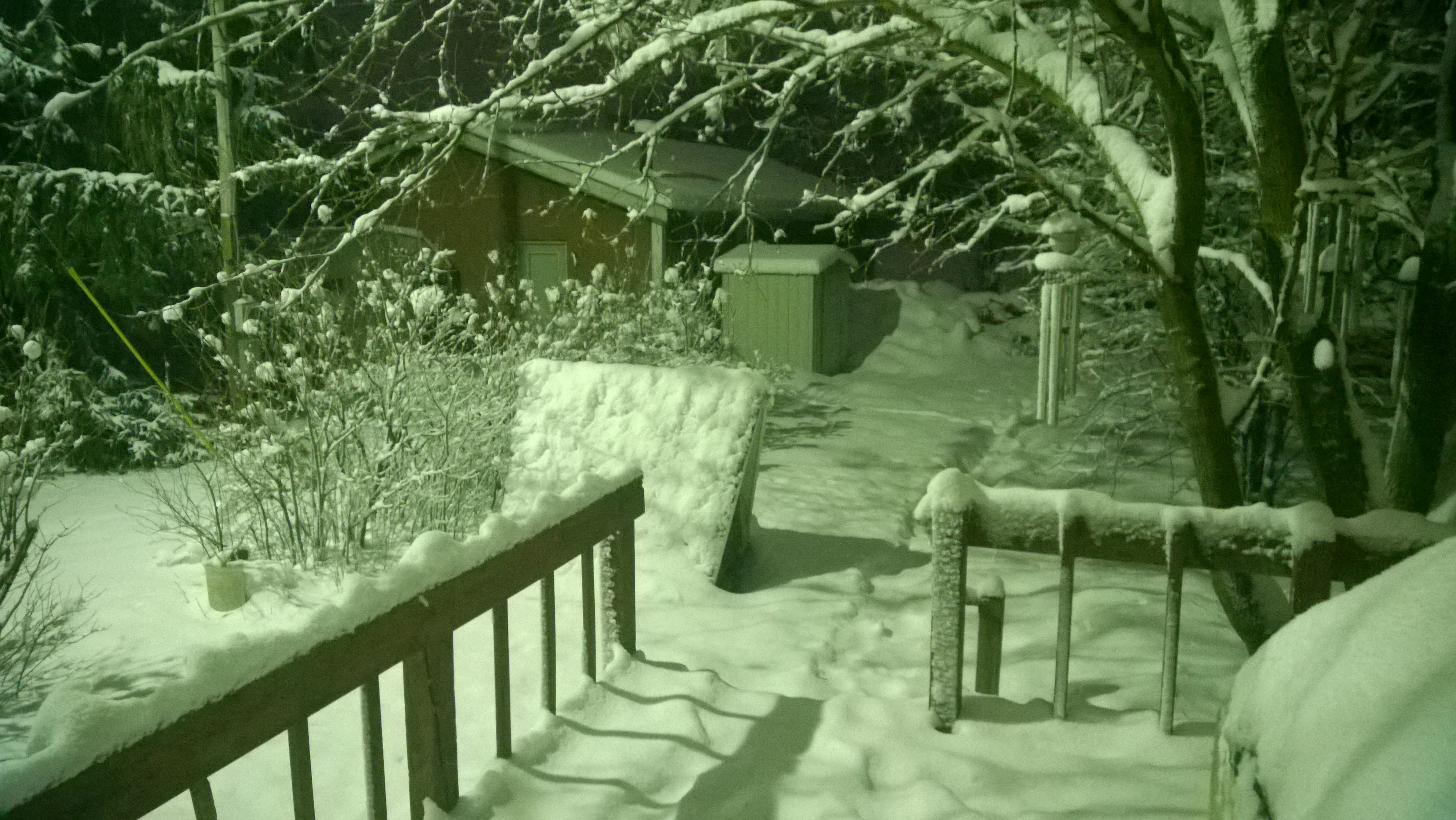
So.. You guys know I have huge pine trees all around, correct? Well, I dont know what is going on, but my white light and the white snow are.. um.. green!?? Only thing I can think of is the green trees.. Check it out:

XxTiTmV.jpg


4FulT4m.jpg


a3E9xFp.jpg
 

MKPM

AMG
Diamond Contributor
Member For 4 Years
Member For 3 Years
Member For 2 Years
ECF Refugee
So.. You guys know I have huge pine trees all around, correct? Well, I dont know what is going on, but my white light and the white snow are.. um.. green!?? Only thing I can think of is the green trees.. Check it out:

XxTiTmV.jpg


4FulT4m.jpg


a3E9xFp.jpg
That normally means that Moulder and Sculley are out there doing stuff.
 

vaperature

Gold Contributor
Member For 4 Years
Member For 3 Years
Member For 2 Years
Member For 1 Year
Member For 5 Years
Nice
So.. You guys know I have huge pine trees all around, correct? Well, I dont know what is going on, but my white light and the white snow are.. um.. green!?? Only thing I can think of is the green trees.. Check it out:

XxTiTmV.jpg


4FulT4m.jpg


a3E9xFp.jpg
Nice, beautiful place.
 

MKPM

AMG
Diamond Contributor
Member For 4 Years
Member For 3 Years
Member For 2 Years
ECF Refugee
It is my greatest desire to live in a more sylvan setting....but not TOO far from a city.
 

glassgrl

Gold Contributor
Member For 4 Years
Member For 3 Years
Member For 2 Years
Member For 1 Year
Member For 5 Years
So.. You guys know I have huge pine trees all around, correct? Well, I dont know what is going on, but my white light and the white snow are.. um.. green!?? Only thing I can think of is the green trees.. Check it out:

XxTiTmV.jpg


4FulT4m.jpg


a3E9xFp.jpg
Maybe the camera is picking up the only color that's there besides white? Your place reminds me of my grandparent's farm so very much.
 

Midniteoyl

Gold Contributor
Member For 4 Years
Member For 3 Years
Member For 2 Years
Member For 1 Year
Member For 5 Years
Maybe the camera is picking up the only color that's there besides white? Your place reminds me of my grandparent's farm so very much.
Its green to my eyes too.. All th eother night pics have been in normal color.. This is just weird :confused:
 

russ81072

Gold Contributor
Member For 4 Years
Member For 3 Years
Member For 2 Years
Member For 1 Year
Member For 5 Years
Time to go do some more snow blowing.

Sent from my SAMSUNG-SGH-I537
 

InMyImage

Gold Contributor
Member For 4 Years
Member For 3 Years
Member For 2 Years
Member For 1 Year
Member For 5 Years
I'm using chrome and when I upload a pic from my files it always gives me a choice of thumbnail or full size. Are you uploading from a different location? Just a guess, I'm not savvy on such matters.

I don't upload at all. I use dropbox and just paste a link to the file in the dialog to add an image to the post.

So much simpler than any other method and replicates all my data files to all of my computers as well as giving me a web page to get to all my files from any computer in the world if I need to.

Bonus is that it uses DOD certified encryption.
 

vaperature

Gold Contributor
Member For 4 Years
Member For 3 Years
Member For 2 Years
Member For 1 Year
Member For 5 Years
ok that last round of snow shoveling was the worst, I'm done, just remembered I forgot to eat today, have you ever been so empty stomached that you don't even feel hungry?
 

MKPM

AMG
Diamond Contributor
Member For 4 Years
Member For 3 Years
Member For 2 Years
ECF Refugee
Posting from Dropbox does not work for me that is....I just tried putting the share link into the picture dialogue....all I get is a wee blue box with a ?
 

InMyImage

Gold Contributor
Member For 4 Years
Member For 3 Years
Member For 2 Years
Member For 1 Year
Member For 5 Years
was the file in your public folder?
 

VU Sponsors

Top