Can someone please point me in the right direction I need a download that is compatible with Chrome OS am I going to be able to update this or am I going to have to find a windows or mac to get this done?

Become a Patron!
You are using an out of date browser. It may not display this or other websites correctly.
You should upgrade or use an alternative browser.
You should upgrade or use an alternative browser.
Cuboid - New Firmware 3.01 and 3.11
- Thread starter BatteryConserver
- Start date

Can someone please point me in the right direction I need a download that is compatible with Chrome OS am I going to be able to update this or am I going to have to find a windows or mac to get this done?
I think you need Windows or Mac

Vapomizer
Silver Contributor
Member For 4 Years
Member For 3 Years
Member For 2 Years
Member For 1 Year
You can not update through Chrome OSCan someone please point me in the right direction I need a download that is compatible with Chrome OS am I going to be able to update this or am I going to have to find a windows or mac to get this done?
You confused me there, I thought this has a "battery conserver" featurethanks for the heads up BatteryConserver. anyone tried it yet? everything go smoothly?

New 3.02 and 3.12 firmware out today. I haven't added an image but I like the new menu. It groups the Ni Ti & SS settings into one sub menu and it also shows your TCR value when you are using the M1-3 settings. Overall it's quite nice.
http://www.joyetech.com/mvr-software/?sid=171
http://www.joyetech.com/mvr-software/?sid=171
@CorallineAlgae thanks for the heads up. custom logo looks fun 
You bet. I just added a Batman logo to my VTC Mini using the new firmware. Fun stuff. The logos don't get in the way and once you have one loaded you can easily turn it on or off by holding down the power and right button.@CorallineAlgae thanks for the heads up. custom logo looks fun
Switching wires works a little different now. At first I thought they removed Ni, Ti,...
Yeah, that confused me at first. Now that I have it sorted out I definitely prefer the new menu. Gotta give em props. JoyeTech keeps refining these things. I'm only using mods with Joyetech boards these days and I'm so happy with all of them. The VTC Mini, Cuboid, Presa 75 and Pico all kick ass.Switching wires works a little different now. At first I thought they removed Ni, Ti,...
little cthulhu logo for the cuboid...one thing i noticed when i made mine is that it has to be all the way to the right of the canvas to be centered on the cuboid screen...and the background color has to be white and the design has to be black, which i got backwards the first time.
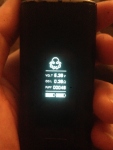
Last edited:

Nice........but the update has in effect cancelled my ability to update further OR even access the units to upload a custom graphic.......updated both mine and now the software will not recognize EITHER of my two units, only thing plugging the USB does is charge the unit.....it never reads out the current version or even beeps or blinks and all the menu options stay dimmed out....even tryed to get old update program to recognize it ......no luck......little cthulhu logo for the cuboid...one thing i noticed when i made mine is that it has to be all the way to the right of the canvas to be centered on the cuboid screen...and the background color has to be white and the design has to be black, which i got backwards the first time.
View attachment 48288
So be careful with this update.....both my units are working fine with the new software, but anything related to using the graphic uploading or any further updates are screwed on my two units..........wish I'd have know this before I order another one, it will be in Monday most likely with 3.10 on it, so I'll see if its the software/computer/cable issue or if it's the update.....
thats weird. the night i made my logo i was in and out of the update software repeatedly, and i flashed the logo about five times before i got it centered and everything perfect.Nice........but the update has in effect cancelled my ability to update further OR even access the units to upload a custom graphic.......updated both mine and now the software will not recognize EITHER of my two units, only thing plugging the USB does is charge the unit.....it never reads out the current version or even beeps or blinks and all the menu options stay dimmed out....even tryed to get old update program to recognize it ......no luck......
So be careful with this update.....both my units are working fine with the new software, but anything related to using the graphic uploading or any further updates are screwed on my two units..........wish I'd have know this before I order another one, it will be in Monday most likely with 3.10 on it, so I'll see if its the software/computer/cable issue or if it's the update.....
what have you tried in terms of troubleshooting? different cable? different usb port? restart pc? power cycle cuboid? re-download updater software? double check that there isnt an instance of the updater opened/crashed in your task manager? cant think of anything else off the top of my head to try. it seems strange that both of your cuboids are doing the same thing and makes me think its cable or pc related.
So was I on both firmware updaters. Shut pc went to bed. Got up turned pc on tried to upload....nada...cables only been used maybe a dozen times. Tried another cable I had around, same issue. Restarted pc tried several times again.thats weird. the night i made my logo i was in and out of the update software repeatedly, and i flashed the logo about five times before i got it centered and everything perfect.
what have you tried in terms of troubleshooting? different cable? different usb port? restart pc? power cycle cuboid? re-download updater software? double check that there isnt an instance of the updater opened/crashed in your task manager? cant think of anything else off the top of my head to try. it seems strange that both of your cuboids are doing the same thing and makes me think its cable or pc related.

Same results. Will dig out other joyetech cable tomorrow and try again.
only other thing i can think that i didnt list already is to try is taking the batteries out of the cuboid and plug it in. i just verified with mine that it will power up and the updater software can still see it and report my fw version (3.12). did you try different usb ports on your pc, or re-downloading the updater from joyetech site?
Yea.....even changed to another pair......turned it off, removed and replaced. Restarted....same issue
Sent from my SM-T530NU using Tapatalk
 i hate it when things dont work right
 ok if all those things failed the last thing i can think that could fix it is to wait until the next update comes out, and hope the updated updater can connect properly. sorry man, thats all i got

Will try new cable, delete all versions of updater and redownload........I have another mod coming in Monday, so if all fails will try to read mod to verify issue. Have sent an email to joyetech (like they'll answer) today explaining issue, so IF they answer maybe they know.
Sent from my SM-T530NU using Tapatalk
Sent from my SM-T530NU using Tapatalk
 update us on monday
i just saw your other thread on this and i didnt realize there was a newer version than 3.12 out. i just updated to it, updated my logo, exit the updater, unplugged my cuboid, then plugged it back in and ran the updater again, and all is well.
in the new update the logo is 'fixed' so that the colors are not inverted, and the logo itself is centered properly. now the logo on screen looks like the logo.bmp you have to use.
also flappy bird is on there now, which is interesting lol...pretty soon these mods are going to have d-pads and 4-6 buttons...people will port mame and doom to them and they will have flash expansion slots for roms and mp3s and stuff
in the new update the logo is 'fixed' so that the colors are not inverted, and the logo itself is centered properly. now the logo on screen looks like the logo.bmp you have to use.
also flappy bird is on there now, which is interesting lol...pretty soon these mods are going to have d-pads and 4-6 buttons...people will port mame and doom to them and they will have flash expansion slots for roms and mp3s and stuff