Kiwironic
Member For 4 Years
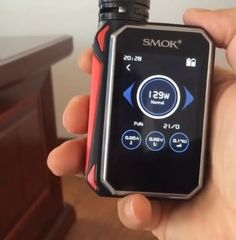
Hi guys, I just bought myself a SMOK G-Priv which I like.
However, after setting up the Date/Time settings (firmware 1.8), I noticed that the clock has stopped working, it just ALWAYS appears as the same data/time you have set it to be and never moves.
Here are the things I tried:
 but heard nothing so I diagnosed the problem and solved it myself.
NOTES:
SOLUTION
Diagnoses:
There is a small battery soldered to the main board of the G-Priv that keeps the Date/Time Settings, this is why "Factory reset" and unplugging batteries won't reset your time or Hard-Reset your SMOK G-Priv.
It seems that setting up the Date/Time including the seconds when done not fast enough causes this bug. The old time lapsed to a new minute while the new time has changed that. Poor validation in the board caused this bug to happen. This is only an assumption.
Solution:
Hard reset your G-Priv by disconnecting the internal battery and reconnecting it. So far there seems to be no other way.
You will need:
Steps:

However, after setting up the Date/Time settings (firmware 1.8), I noticed that the clock has stopped working, it just ALWAYS appears as the same data/time you have set it to be and never moves.
Here are the things I tried:
- Downgrading to Firmware 1.7 (link: https://odhk2xgq4.qnssl.com/file/1482745533318zc1zk0eacrfu79l42gm34n29.zip)
- Factory Reset
- Setting clock
- Upgrading to 1.8
- Factory Reset again
- Setting clock.
- Enable Puff limit
- Disable puff limit
- Reset puff limit
- Remove batteries for 1 day
but heard nothing so I diagnosed the problem and solved it myself.NOTES:
- If your clock is working, GREAT!!!! Try not to set up seconds EVER as this (might) be the issue. Set your Date/Time but never the seconds for the time.
- When upgrading/downgrading firmware, don't trust the SMOK instructions. You have to be fast and keep your finger on the button. Also be patient.
SOLUTION
Diagnoses:
There is a small battery soldered to the main board of the G-Priv that keeps the Date/Time Settings, this is why "Factory reset" and unplugging batteries won't reset your time or Hard-Reset your SMOK G-Priv.
It seems that setting up the Date/Time including the seconds when done not fast enough causes this bug. The old time lapsed to a new minute while the new time has changed that. Poor validation in the board caused this bug to happen. This is only an assumption.
Solution:
Hard reset your G-Priv by disconnecting the internal battery and reconnecting it. So far there seems to be no other way.
You will need:
- Screwdriver
- Soldering iron and some soldering experience
Steps:
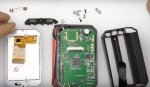
- Disassemble your G-Priv until you can see the internal battery. It is located under the screen. If you want instructions on how to disassemble your G-Priv take a look at this video, if you can do soldering, you're smart enough to do it easily:
- Disconnect the screen ribbon.
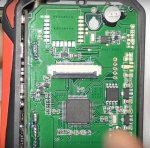
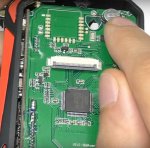
- Find the small battery as shown in photos blew (Photos Credit goes to Daniel from djlsbvapes) :
- Disconnect the battery by desoldering one or both leads.
- Re solder the leads you have disconnected.
- Put everything back together.
- Put your 18650 batteries in
- Turn on the device, set it up and don't set the seconds unless you do it very fast.
- All fixed.

 cuz that sounds wrong to me... Course I am blond
  And have no clue when it comes to soldering... never done it myself but I mentally know some of the steps, ya got the Iron, the flux, and the soldering wire. Yada yada yada... but it just doesn't makes sense, dealt with a lot of electronics with cmos/button batts and all ya gotta do is pop it out.


 I am trying to reverse engineer the firmware so that I can customise it and get it to SYNC puff data with my PC, give me graphs of daily activity and puffs. Average puff count, average puff duration (in seconds) etc... It all depends on the amount of memory installed on the board. I hope this works.
 Not safe for OCD types. Just because you can doesn't mean someone should.