

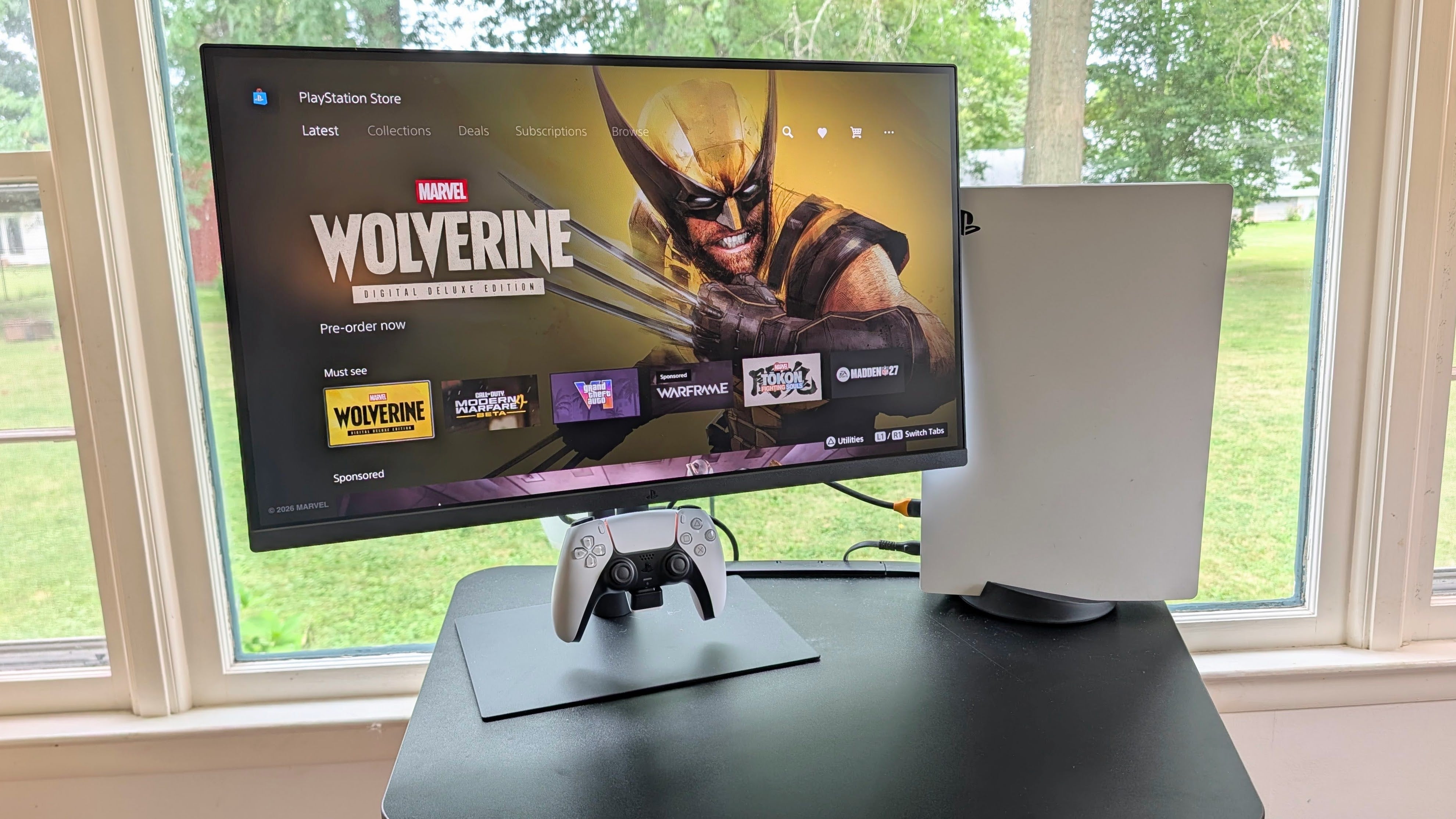
The separation between PC and console gaming is hazier than ever thanks to soaring prices, scarce hardware, and PC ports of formerly exclusive games. Go into the average PC gamer’s home and you’re likely to find at least one console, and that’s exactly the crowd that Sony hopes to appease with its new PlayStation 27” Gaming Monitor. Designed to match the look of your PS5 or PS5 Pro perfectly, it packages a QHD resolution with high refresh rate gameplay, auto-HDR, and a foldaway charging dock for your DualSense controllers for $349.99. If you’re a PlayStation fan, it’ll make a great addition to a desk-based gaming setup. If you don’t care about its PS5 look, however, this really isn’t the monitor you’re looking for.
Purchasing Guide
The Sony PlayStation 27” Gaming Monitor with Charging Hook is available from Best Buy starting on August 27 for $349.99.
Design and Features
It only takes a second to see who the monitor is aimed at. Between the black stand and white back of the monitor itself, it’s a perfect match for the PS5. The branding is minimal: a simple PS logo that peeks out above the stand when viewed from the rear.
The monitor comes perilously close to looking boring from the front. It’s the usual profile we’ve seen on flat panel gaming displays for years, with vanishingly thin bezels that lend the display a feeling of spaciousness. There are no visible controls. Toggling settings in the OSD is done with a joystick in the back. In short: black rectangle.
That is, until you start using the display’s biggest console-specific feature: its DualSense charging hook. Centered behind the display is a flip-down charging dock to store and charge your DualSense and DualSense Edge controllers when not in use. It sounds small - it is small - but it’s exactly the kind of quality-of-life feature that PS5 players will appreciate. No more loose controllers or wires to clutter up your desk, just your neatly glowing DualSense under your now very PlayStation- looking monitor.
As the first real PlayStation-branded monitor (Sony Inzone also offers PC gaming monitors but is a separate line from PlayStation), I expected Sony to go big: OLED, high refresh rate, high peak brightness, and an even higher price. Instead, it went the opposite direction by offering something entirely more accessible to the average person.

Coming in at $350, it offers some pretty decent specs no matter which platform you choose. Within its slim frame, it features an IPS panel with a sharp 2,560 x 1,440 resolution. It’s built for everything from turn-based RPGs to twitch shooters, sporting a quick 240Hz refresh rate on PC and 120Hz on console (the PlayStation 5’s peak output). It also comes with Variable Refresh Rate (VRR) support so your gameplay stays fluid. It’s technically AMD FreeSync, but worked well with Nvidia G-Sync too.
While it’s not OLED, its Fast IPS panel is a good example of why you should still be paying attention to this tech. The colors are vibrant and the viewing angles are wide. It features a 1ms gray-to-gray response time which won’t get you the exceptional motion clarity of OLED but is effective at keeping ghosting away. Sony also did a good job calibrating the display from the factory. Out of the box, I measured color accuracy to be just under the industry standard of Delta E < 2, so you could even use it for image or video editing.
Around the back, the monitor’s I/O is neatly tucked away. It comes with two HDMI 2.1 ports and a DisplayPort 1.4, and a couple of USB Type-A ports and one Type-C to support peripherals and accessories. The charging hook folds away just below this, so if you tend to keep your monitor low, you may need to raise it when the hook is in use.
The stand is disappointing for the price. It’s a flat metal slab and a vertical metal tube and that’s about it. You’re able to make the usual tilt and height adjustments and rotate it but you can’t pivot into a portrait orientation. It does support standard VESA 100 x 100 mounts, so finding a replacement isn’t difficult if it bothers you.
The monitor has a few other PlayStation-specific tricks up its sleeve, like Auto HDR Tone Mapping which automatically adjusts the console’s HDR settings to match on setup. Also, it has a built-in speaker so you can hear your games even if you don’t feel like plugging in a headset. That shouldn’t be novel, but it’s not a given anymore. Without the connection to PlayStation, it’s not a display that would have more than a headphone jack in most cases.

But you should still use a headset. While it’s admirable that Sony included a speaker here, it feels like a “break glass in case of emergency” kind of addition instead of something I would actually recommend you use. The sound is thin and tinny, and I found it harsh to listen to for very long. It will work in a pinch, but even a cheap gaming headset will perform leagues better.
Though the PlayStation 27" gaming monitor doesn't feel cheap necessarily, there is a sense that Sony pared things back to make it as affordable as it is. The cheap stand is one example, but it shows through in other ways too.
The OSD, for example, is basic and feels too generic for a monitor like this. It's functional, but it doesn't carry the same premium touch as the hardware around it. There are a couple of neat things you can do, like displaying your framerate in the corner or automatically changing color profiles to match the genre of the game you're playing, but beyond that, it's standard fare: brightness, contrast, saturation, sharpness, inputs and outputs, volume, and so on. It gets the job done, but it won't wow anyone navigating through the menus. Unlike the Inzone monitors, there’s also no software to allow you to make adjustments with a mouse and keyboard.
Another is the same IPS panel I was praising earlier. While those pros are definitely there, there are some cons to be aware of too. There’s nothing special about this monitor’s contrast. It’s edge-lit, no full array local dimming, so blacks can be inconsistent across the display. No matter where you’re looking, black looks closer to dark gray and it earns its decidedly average 1000:1 contrast ratio.
Its average rated brightness, 350 nits, is decidedly middle of the road. It’s not bright enough to match the highlights and shadows of most TVs these days, but does find a balance between console and PC play. When you’re playing on your PS5, the auto HDR tone mapping allows the display to better represent highlights and shadows, offering more detail within the picture. On PC, there’s no automatic tone mapping but I did find that it was bright enough to use in a well lit room.

Performance
I was able to spend about a week with this monitor ahead of this review, and I hit it hard during that time. I set up the PS5 in one input and an RTX 5090 gaming laptop in another to see how it would handle switching between both platforms. Perhaps expectedly from a company well known for its displays, it performed well for both and a fair share of productivity in between.
While it might seem like a missed opportunity to go with QHD (1440p) resolution and not 4K, I think going QHD was the smart move. 1440p sits in a sweet spot where it looks crisp and detailed on 32” monitors or below but isn’t so demanding that you need the most expensive hardware to make the most of it. There aren’t many PCs capable of running many games at 240Hz without dramatically lowering settings – a major trade-off if you’ve already shelled out for a decent gaming PC and a new monitor. At QHD, that suddenly becomes much more attainable.

Playing on the PlayStation 5, I was impressed at how well the auto tone mapping feature worked. It's not HDR, but it’s better than SDR, and that alone is an improvement over the average gaming monitor at this price. My console had no trouble detecting the monitor and its capabilities, so enabling VRR and 120Hz only required a quick trip to the settings menu.
On PC, I felt the lack of quality HDR much more but gaming on it was still visually rich and a lot of fun. IPS colors are vivid and are perfectly capable of making games look great in SDR. VRR also worked well on both my Nvidia and AMD gaming laptops.
The charging hook also worked perfectly. It’s a simple system that allows you to quickly dock a controller without giving it much thought. Like other controller docks, it needs to work and get out of the way. This does that. Missed opportunity to give the hook a bit of accent lighting like the PS5 itself though, Sony.
Taken as a whole, the monitor delivers on its promises and does no more and no less. If you strip away all the PlayStation branding, what you’re left with is a decent monitor with a mediocre stand and cool charging hook. Plenty of monitors have USB ports and 1440p resolution. Plenty of monitors offer better brightness and better HDR with full array local dimming. Many of them cost under $350.
What the PlayStation monitor offers is a quiet guarantee that everything is going to work with a minimum of setup and fuss, especially with your PS5. It’s already going to blend in with part of your setup, and if you have your PS5 visible, you can count on them being a good looking pair.
The charging hook, as seemingly small and replaceable as it is, is probably the single most important feature for making it actually feel like a PlayStation monitor. Let’s be real here. You probably won’t be looking at the PS branded back of your monitor very often. Once you set it up with your PC, the auto tone mapping becomes something you don’t even think about shortly after. But the controller, pulsing with its little status light, is a constant reminder that you’re using a PlayStation accessory. And it’s useful to boot.
Christopher Coke has been a regular contributor to IGN since 2019 and has been covering games and technology since 2013. He has covered tech ranging from gaming controllers to graphics cards, gaming chairs and gaming monitors, headphones, IEMs, and more for sites such as MMORPG.com, Tom’s Hardware, Popular Science, USA Today’s Reviewed, and Popular Mechanics. Find Chris on Twitter @gamebynight.
Continue reading...